PaintAI: AI Paint Color Visualizer
PaintAI is a free AI paint tool: upload a photo of your home and see new exterior and interior paint colors in seconds. Try colors before you paint, then download.
Select Paint Mode
Exterior Paint
Interior Paint
Weather-Specific Paint
Upload Image
Instructions
Polished, photoreal magazine look
Results
Your paint design will appear here after generation
Your paint design will appear here after generation
How the AI paint visualizer works
Upload a photo of your house or a room, type the colour you want, and the AI repaints the photo. You get one repainted image per run, so you can try a colour on your own walls before you buy paint.
- Pick a mode: Exterior Paint, Interior Paint or Weather-Specific Paint.
- Upload one clear photo.
- Type a colour in the colour box, or use the colour picker and the area options (for example trim, front door or one accent wall).
- Click Generate Paint Design, then download the result or try another colour.
Exterior Paint
For a house, apartment, office building, commercial building or garage/shed. Show the whole facade, without cars or trees in front.
Interior Paint
For a living room, bedroom, kitchen, bathroom, dining room, home office, laundry room or hallway. Include as much wall as you can.
Weather-Specific Paint
Pick a climate (Sunny/Hot, Rainy/Humid, Cold/Snowy, Coastal/Salty or Variable) and the AI repaints the outside with that climate in mind. It gives a picture, not a product or finish recommendation.
Paint colour examples on one house
Each picture is one run of this tool on the same photo, with the colours named, not retouched. The starting photo is an AI-made sample house, not a real home.
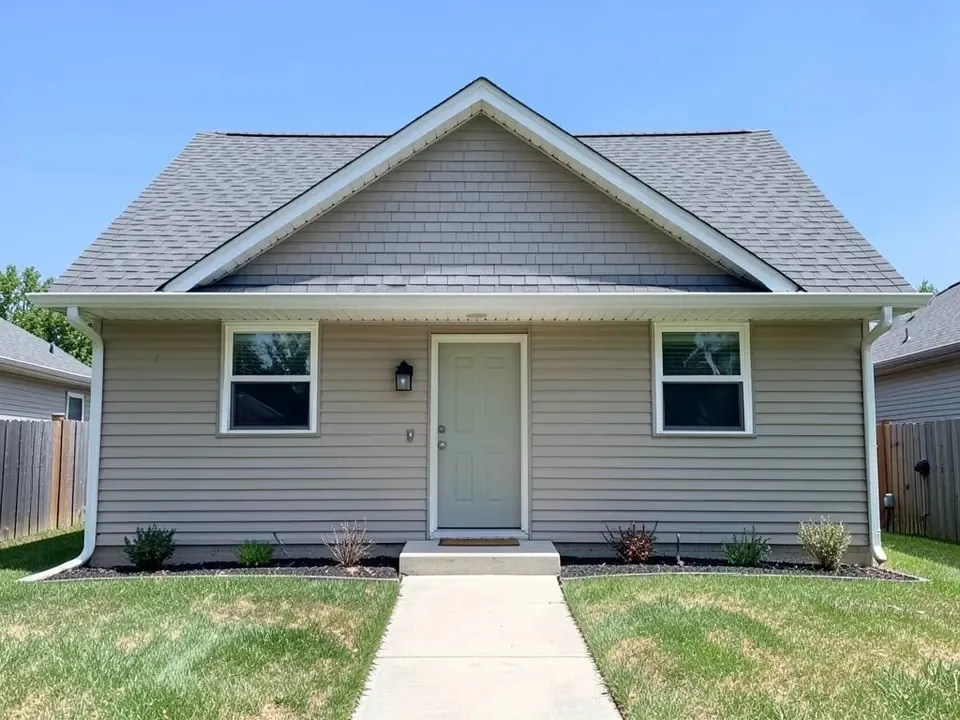
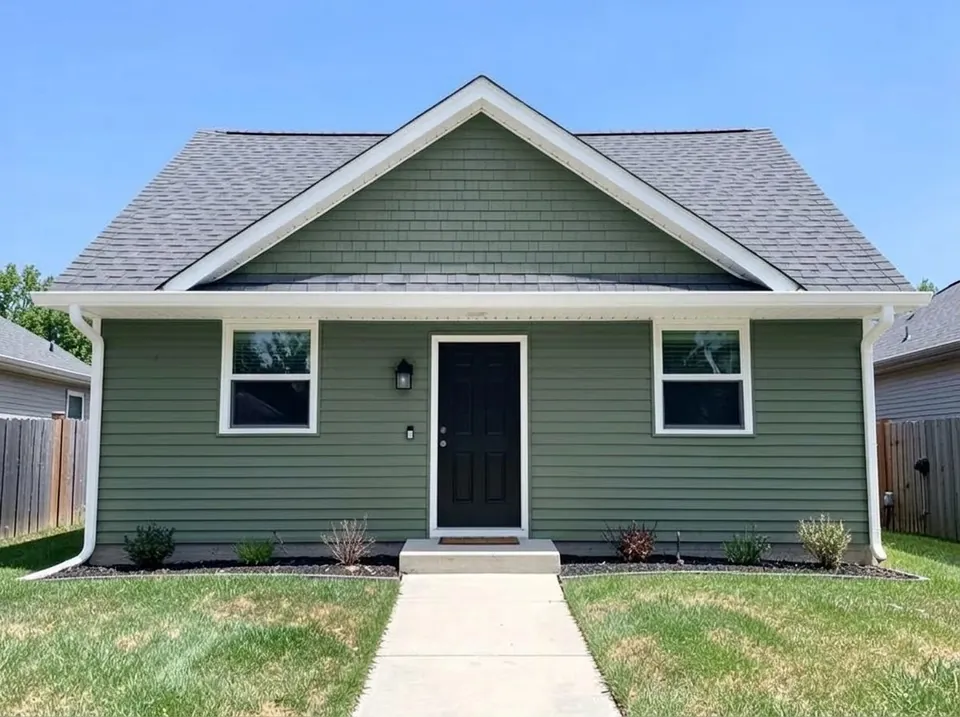
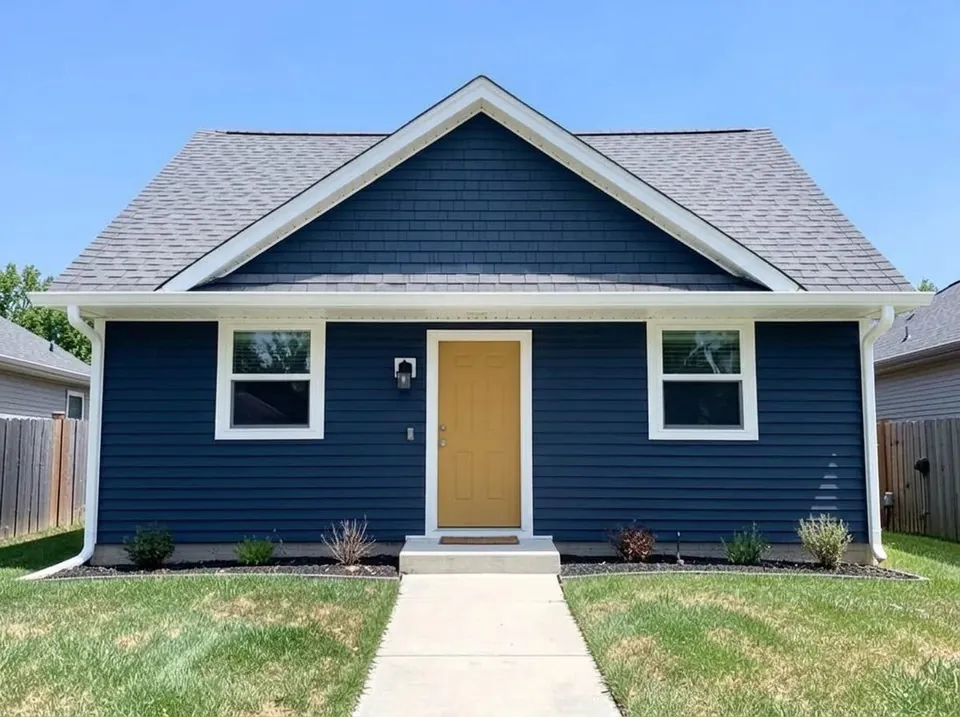
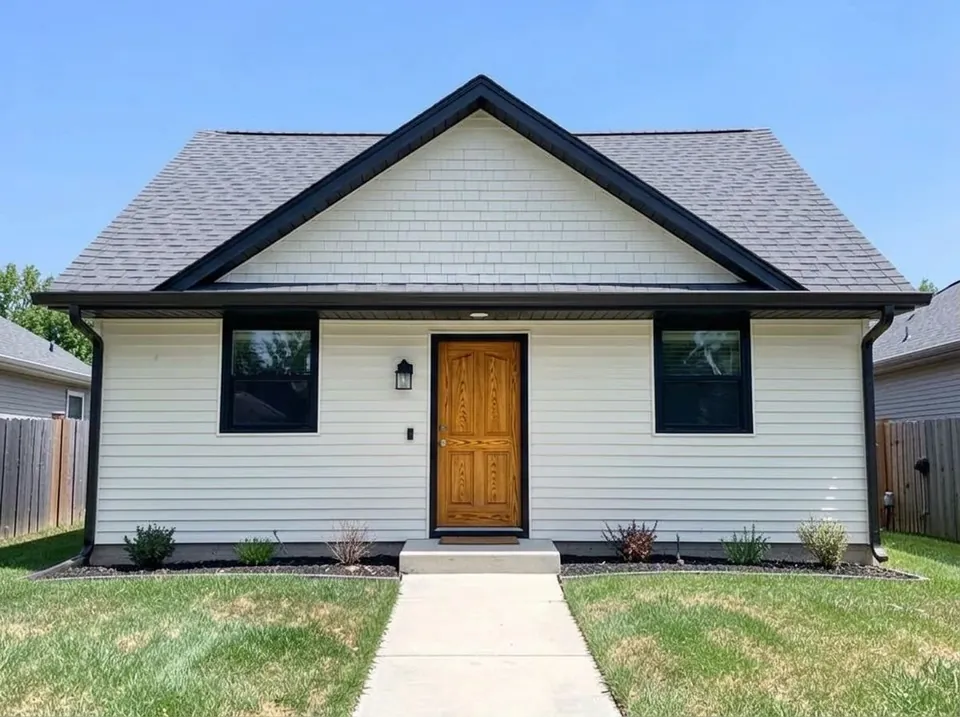
Every run with its exact settings is in How to Choose Exterior House Paint Colors.
Tips for a better result
- Screens and AI images do not show colour exactly. Always test a sample pot on the real wall before you buy.
- The paint calculator on the page is separate from the image: use it to work out how much paint you need.
- Try one colour per run and compare the results side by side.
What it is good for
Use it to narrow down colours with your family, landlord or painter before you spend money on sample pots. New accounts get 1 free render after verifying their email; plans are on the pricing page.
Interior paint visualizer: try a wall colour on a room photo
Pick Interior Paint, choose the room type (living room, bedroom, kitchen, bathroom, dining room, home office, laundry room or hallway) and type the colour. The AI repaints the room in your photo and keeps its layout, the windows and the big furniture where they are.
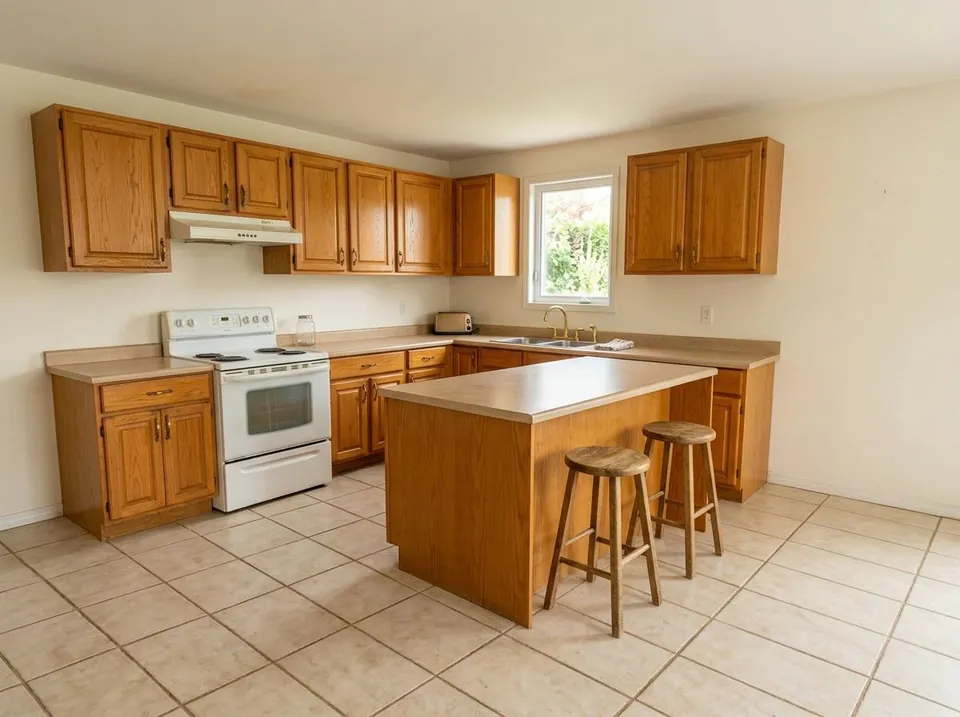
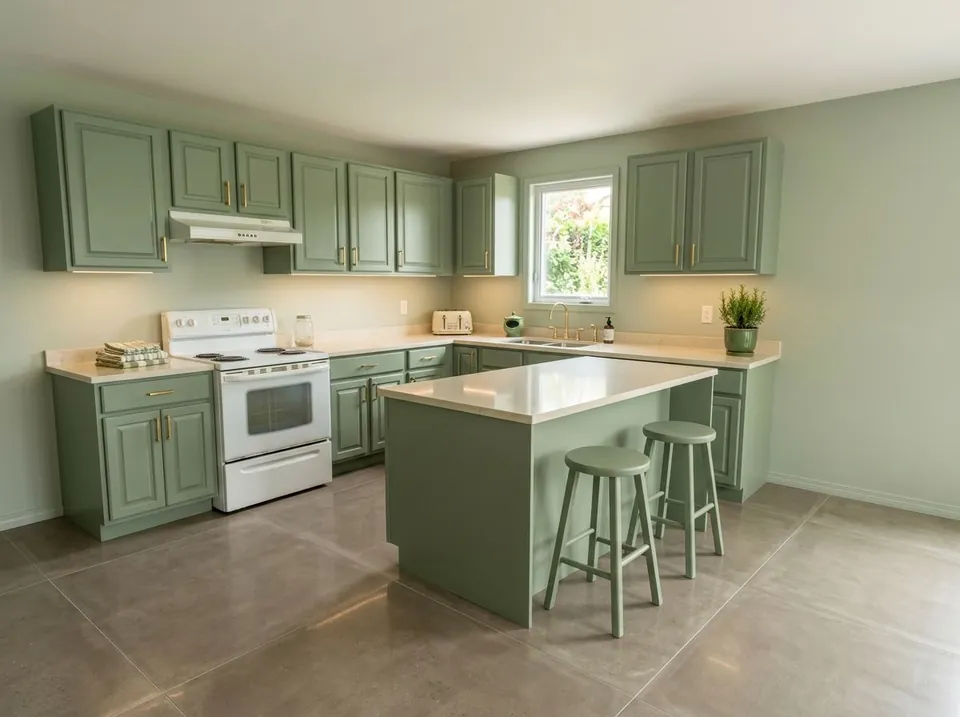
Below is one real run on a sample kitchen with "sage green" typed as the colour. Look at what changed besides the walls: in this run the cabinets and the floor changed too. If you only want new walls, tick "Only the walls"; the tool then asks to keep the ceiling, trim, doors, cabinets, floor and furniture as they are.
Repaint only the walls, or the whole outside
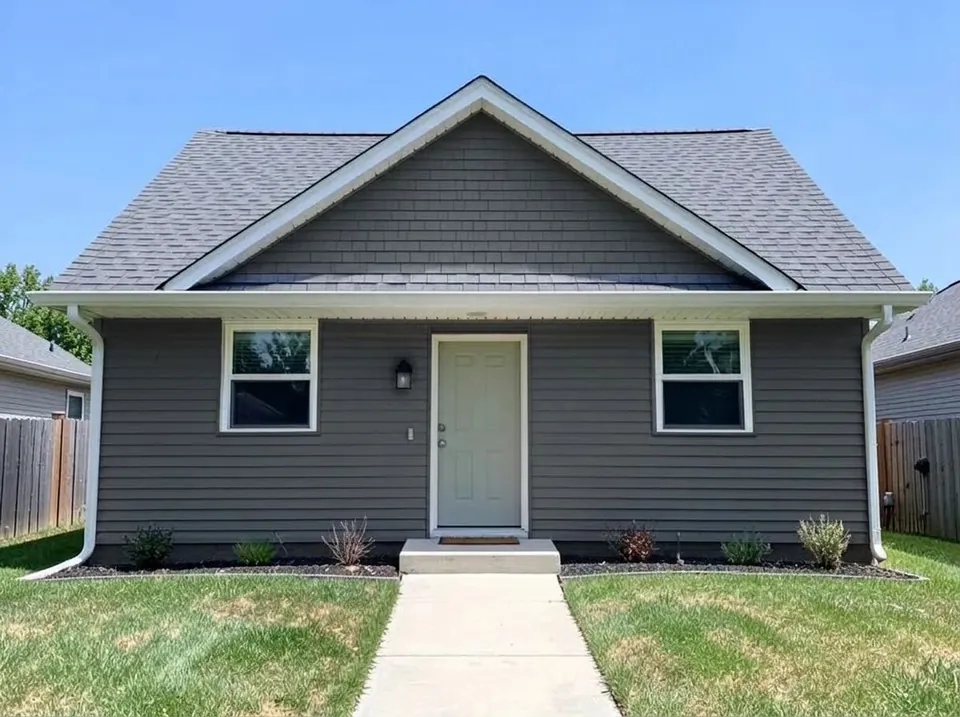
For a house you can change one thing or a full scheme. Type one colour and tick "Only the walls" to keep the trim, the door and the roof as they are, or give the trim, front door, shutters or garage door their own colours in the area boxes.
The charcoal picture below is the same sample house as the examples above, with only the walls changed. Compare it with the sage, navy and warm white schemes, which also changed the trim and the door.
Exterior colour ideas to try on your photo
A house colour is usually three choices: the walls, the trim and the front door. Our colour pages collect ideas with example pictures for each part; pick two or three you like, type them here and compare the results side by side.
- Walls and trim in contrast: white house with black trim.
- Siding: vinyl siding colors.
- Render: stucco house colors.
- The door: front door colors.
- Shutters and the garage: shutter colors and garage door colors.
More colour ideas
Available Languages
Our platform supports a wide variety of languages. Choose your preferred language below to view the site in that language.
Overview
Transform your spaces with our AI-powered tools
AI-Powered Paint Previews
Instantly visualize any wall or surface in new colors using smart detection and rendering powered by AI.
Smart Surface Detection
Automatically detect and isolate walls, ceilings, trim, and exteriors for precision color placement.
Interior & Exterior Ready
Tailored modes for indoor rooms or external facades with curated palettes for both scenarios.
How It Works
Upload a Photo
Choose a photo of the room, facade, or wall you want to paint. Supported formats: JPG, PNG.
Choose Painting Mode
Select whether you're visualizing an interior or exterior project.
Pick Colors or Upload Codes
Type any color or scheme in plain words, such as sage green siding with white trim.
Preview & Compare
Generate the visualization, then download it or try another color.
Use Cases
Discover how our technology can help in various scenarios
Home Renovation Planning
Test different colors on your walls or exterior before making expensive paint decisions.
Interior Design Mockups
Create quick visual mockups for client presentations or design ideation.
Architectural Color Reviews
Architects and designers can evaluate color impact on materials and light behavior.
Real Estate Marketing
Stage properties virtually with neutral or modern paint schemes to attract buyers.
Commercial Branding Projects
See how branded colors would appear on storefronts, office walls, or signage.
Frequently Asked Questions
You can start free. Sign in and new accounts get 1 free render, one time only. Paid plans add more credits.
Absolutely. The exterior mode is specially trained on various building types and lighting environments.
The previews are designed to be visually accurate. For final decisions, physical swatches are still recommended.
Yes. Sign-in is required to generate. New accounts get 1 free render, one time only.
Yes, the tool is fully responsive and optimized for mobile and tablet use.
We do! You can select from templates or describe your custom room/building for better results.