ArchitecturesAI · Guide · Updated October 31, 2026
AI prompts for architecture rendering: 15 prompts that work, with real results
A one-word prompt like "house" still gives you a picture, but it is the AI's idea of a house, not yours. The fix is not longer prompts. It is the right five things in the right order: the building, its materials, its setting, the light and the camera.
Below are 15 architecture prompts. We ran 6 of them, plus a one-word baseline, through our free AI architecture generator once each and show every result as it came out, including what the AI got wrong. The other 9 are ready to copy and adapt.
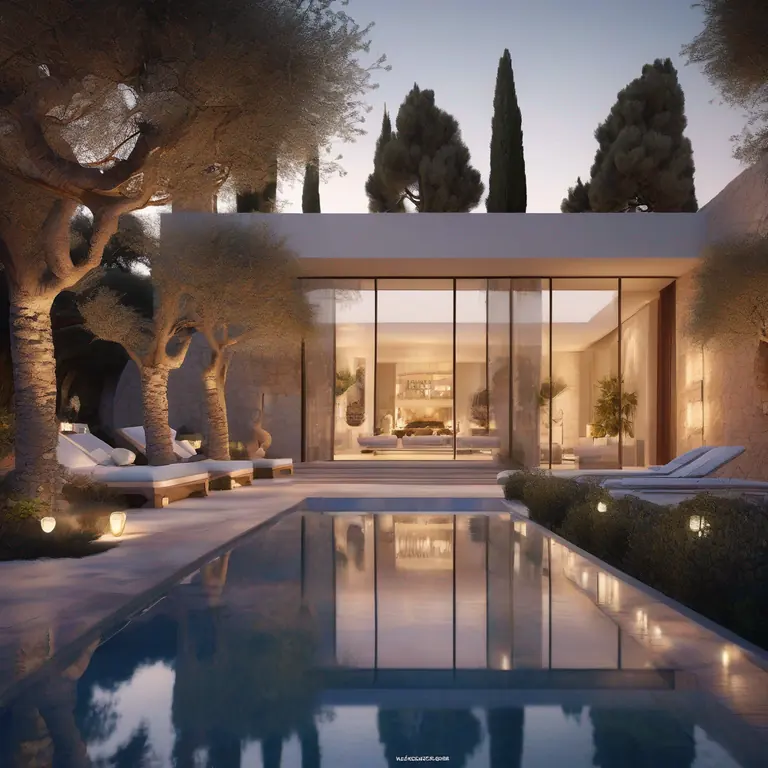
single-storey villa with a long pool in front, warm interior lights glowing through glass walls, stone terrace, olive trees, eye-level view across the pool
Settings: Style Mediterranean, Type Villa, Time Twilight Dusk, Weather Dry
How to write an architecture prompt, step by step
1. Name the building and its size
Start with what it is and how big: "two-storey family house", "single-storey villa", "small library", "four-storey office building". Size words like storeys and "small" change the result more than adjectives like "stunning".
2. Give two or three real materials
Name materials the way a builder would: white render, vertical cedar cladding, board-marked concrete, terracotta, oak floor. Two or three is enough. A long list gets mixed together or partly ignored.
3. Describe the setting
Say what is around the building: a gravel driveway and birch trees, a pine forest, a street with people walking, a reflecting pool. The setting is what makes a render look like a place instead of a product shot.
4. Set the light and weather in the menus, not the prompt
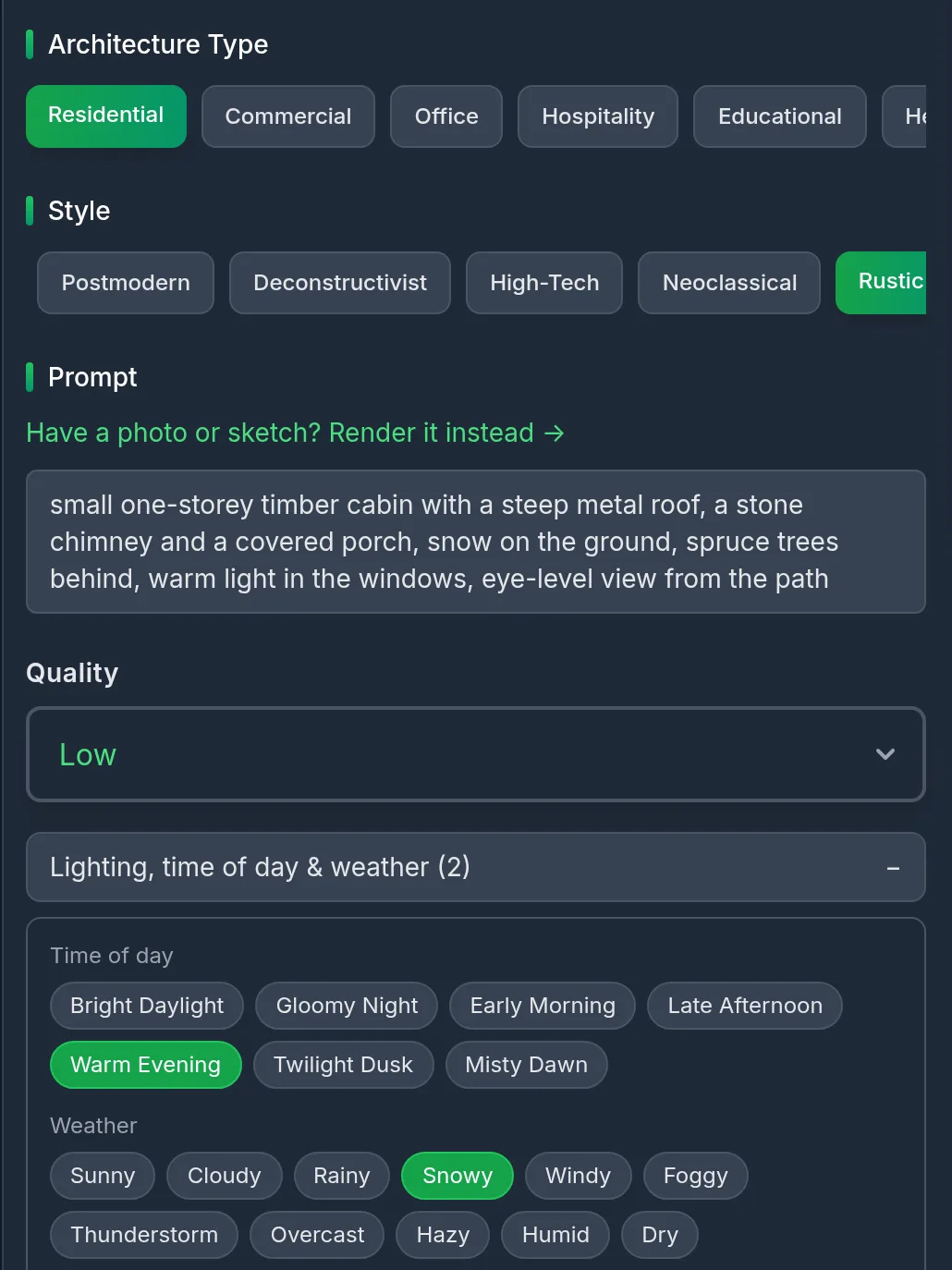
In our generator, time of day (Bright Daylight, Late Afternoon, Twilight Dusk, Early Morning and more) and weather (Sunny, Cloudy, Overcast, Foggy, Dry and more) are their own menus, and so are the style and building type. Pick them there and keep the prompt for the building itself.
The tool builds the final prompt for you in this order: "extremely impressive [style] [type] architecture, [your prompt], [time] scene, [weather]", followed by quality words. That is why you never need to type "modern", "photorealistic" or "4K" yourself.
The generator, set up for the cabin prompt
5. End with the camera
Finish with the view: "eye-level view from the street", "three-quarter view", "aerial view", "eye-level view across the pool". Without it, the AI picks a dramatic angle you may not want.
6. Generate, compare and change one thing at a time
Run the prompt, check what the AI followed and what it dropped, then change one part and run it again. If a detail keeps getting lost, move it earlier in the prompt or cut something else so it has less to compete with.
Free to try. Pick a style, a building type, the time and the weather, then paste a prompt.
Weak prompt vs strong prompt: the same settings, two results
Both images use Style Modern and Type Residential. The only difference is the prompt, and the second one also sets the time and weather.
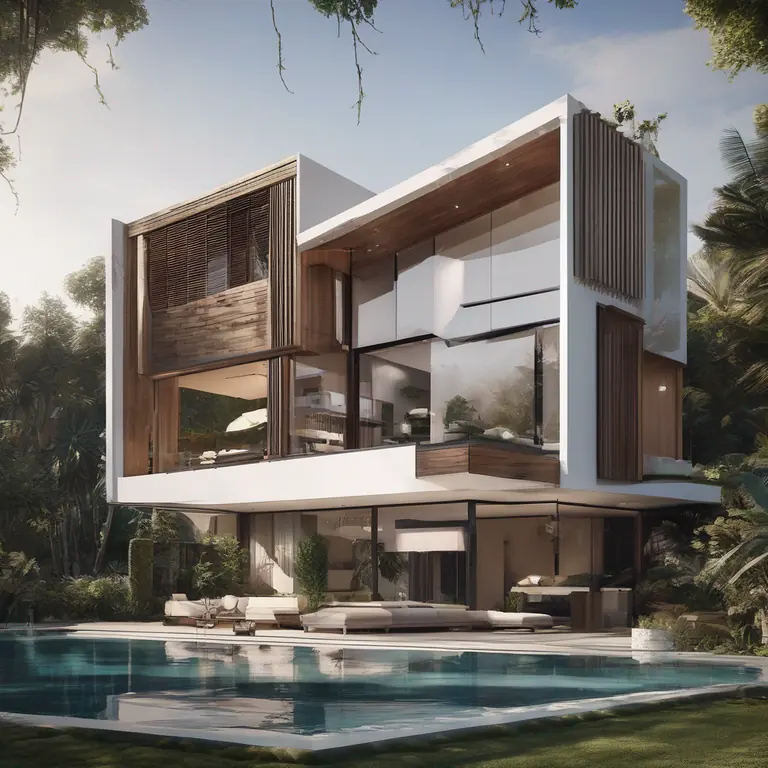
house
Settings: Style Modern, Type Residential, no time or weather
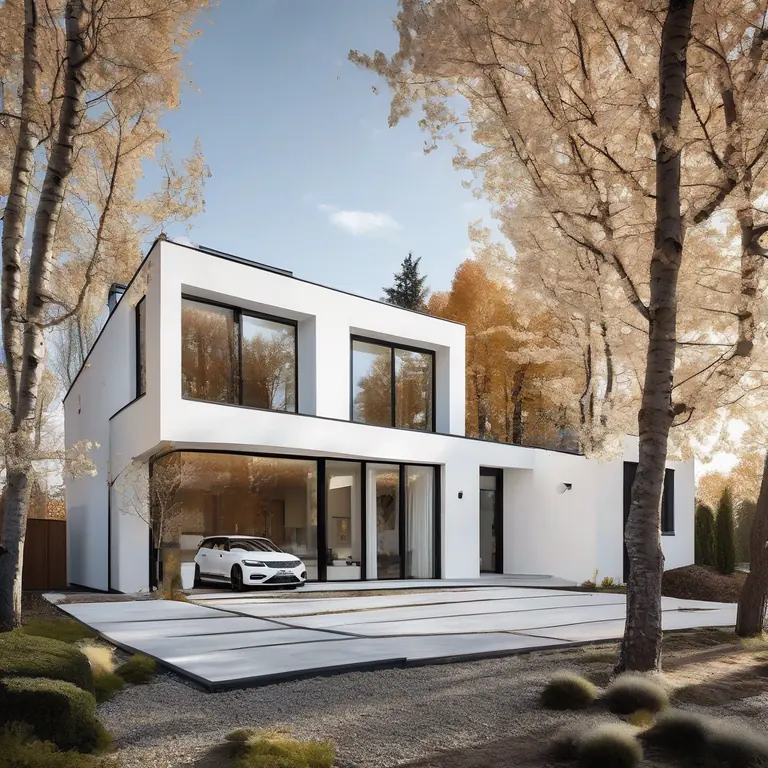
two-storey family house with white render walls and vertical cedar cladding, large floor-to-ceiling windows, flat roof with a deep overhang, gravel driveway, young birch trees, eye-level view from the street
Settings: Style Modern, Type Residential, Time Late Afternoon, Weather Sunny
The lesson: the strong prompt fixed the size, the walls, the windows, the roof, the setting and the camera. The details it dropped were the 4th and 5th material ideas, which is why step 2 says two or three.
5 more tested prompts, with what the AI got right and wrong
Each was run once with the settings shown. We say plainly where the result drifted from the prompt, because that is the part that saves you time.
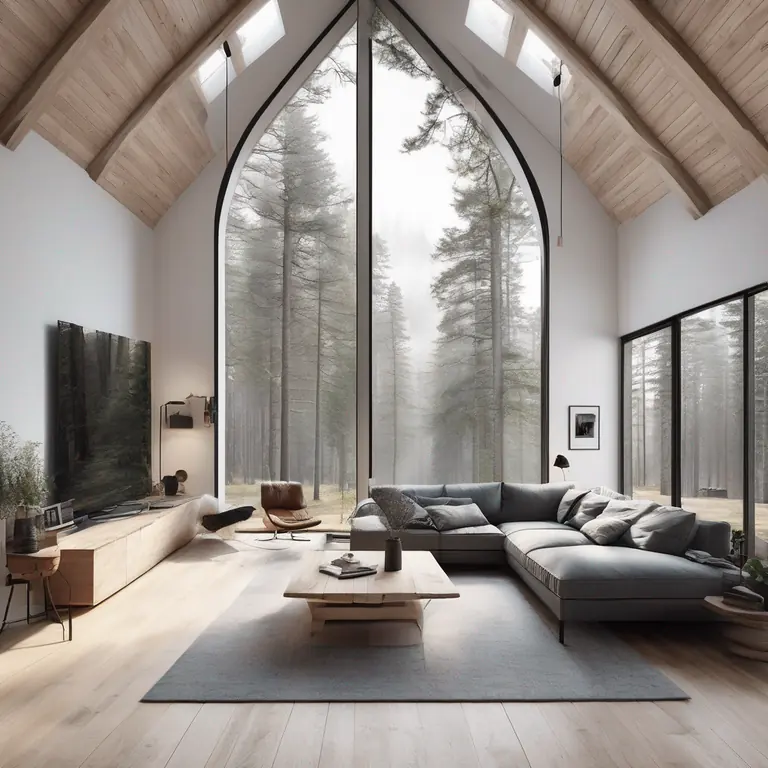
open-plan living room with a double-height ceiling, oak floor, white walls, a tall window onto a pine forest, low grey sofa, eye-level view
Settings: Style Scandinavian, Type Interior, Time Early Morning, Weather Foggy
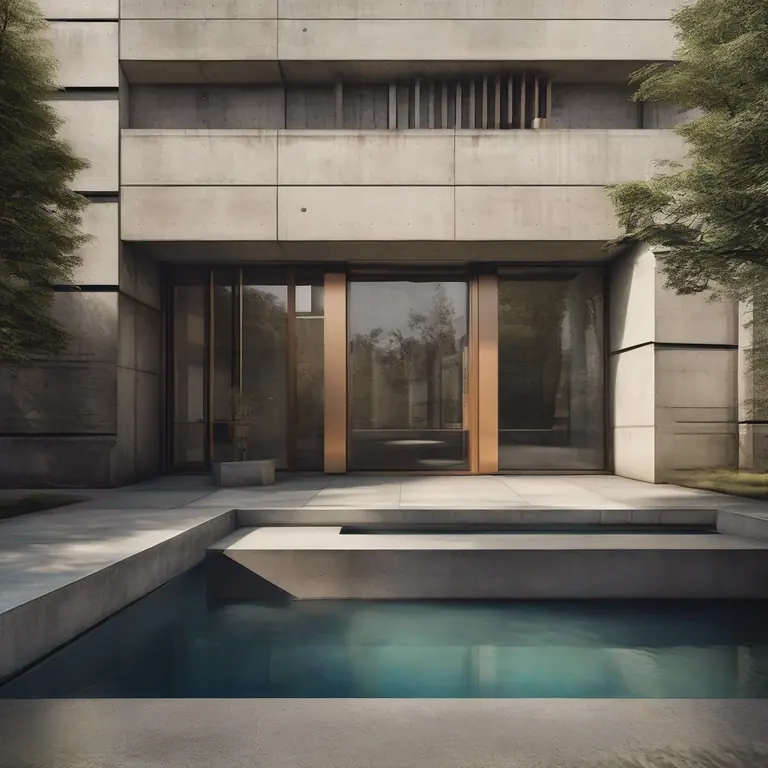
small library with board-marked concrete walls, one large square window, a bronze door and a shallow reflecting pool in front, three-quarter view from the street
Settings: Style Brutalist, Type Cultural, Time Late Afternoon, Weather Overcast
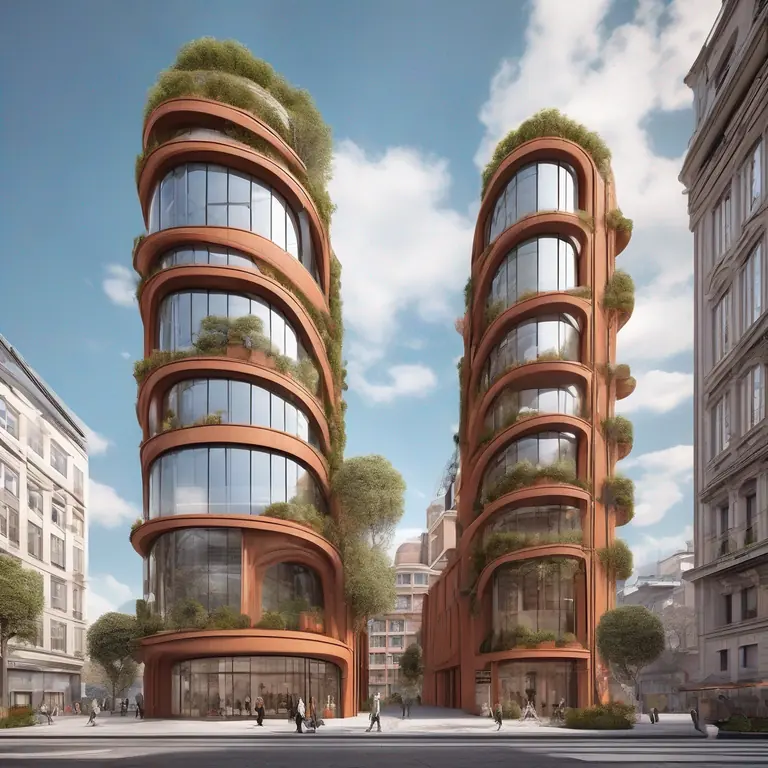
four-storey office building with a facade of vertical terracotta fins, a glass cafe on the ground floor, street trees and people walking, street-level view
Settings: Style Contemporary, Type Office, Time Bright Daylight, Weather Cloudy
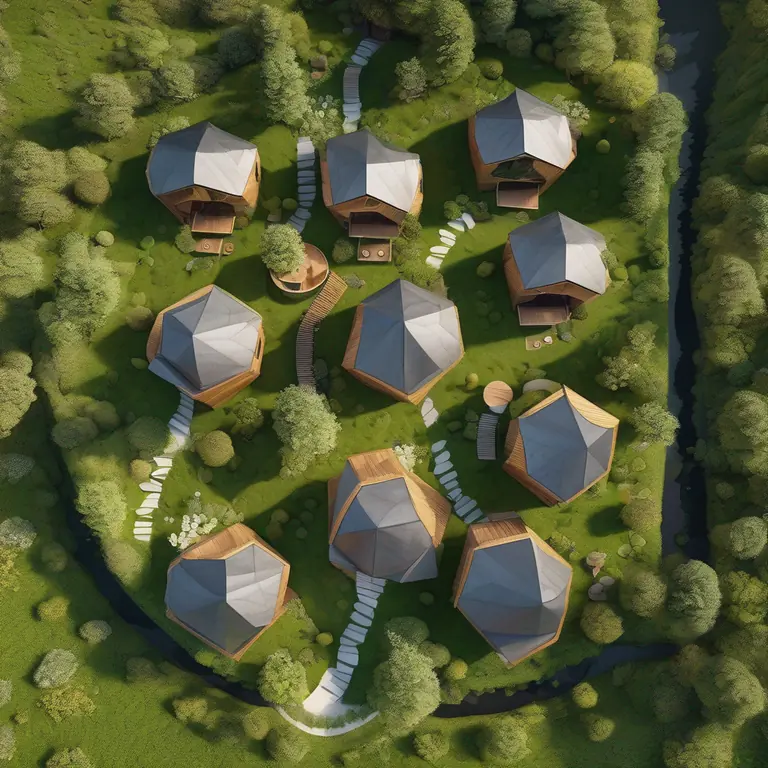
aerial view of six small timber cabins around a shared courtyard on a green hillside, green roofs, gravel footpaths
Settings: Style Sustainable, Type Residential, Time Bright Daylight, Weather Sunny
9 more architecture prompts to copy
These follow the same five-part pattern. We have not shown results for them, so run each once, look at what it followed, and change one part at a time.
- Timber cabin in snow. Style Rustic, Type Residential, Time Warm Evening, Weather Snowysmall one-storey timber cabin with a steep metal roof, a stone chimney and a covered porch, snow on the ground, spruce trees behind, warm light in the windows, eye-level view from the path
- Courtyard house. Style Minimalist, Type Residential, Time Bright Daylight, Weather Sunnysingle-storey house built around a square inner courtyard with one olive tree, white walls, pale stone floor, sliding glass doors on all four sides, view from one corner of the courtyard
- Brick terrace street. Style Traditional, Type Residential, Time Late Afternoon, Weather Cloudyrow of three-storey red brick terraced houses with white sash windows and black front doors, small front gardens with iron railings, eye-level view along the pavement
- Glass pavilion by a lake. Style Modern, Type Hospitality, Time Misty Dawn, Weather Foggysmall glass pavilion with a thin flat roof on a timber deck at the edge of a lake, mist on the water, reeds in the foreground, eye-level view from the shore
- School entrance. Style Contemporary, Type Educational, Time Bright Daylight, Weather Sunnytwo-storey primary school with light brick walls and large coloured window frames, a covered entrance canopy, children's bicycles in racks, three-quarter view from the playground
- Tropical villa. Style Tropical, Type Villa, Time Late Afternoon, Weather Humidtwo-storey villa with deep timber louvres, a thatched-look pitched roof, an infinity pool facing the sea, palm trees, view from the far end of the pool
- Mixed-use corner block. Style Contemporary, Type Commercial, Time Warm Evening, Weather Dryfive-storey corner building with shops on the ground floor and flats above, light stone facade with deep window reveals, lit shop windows, street-level view from across the junction
- Kitchen interior. Style Scandinavian, Type Interior, Time Early Morning, Weather Sunnysmall kitchen with pale oak cabinets, a white worktop, open shelves with ceramics, one window over the sink with morning sun, eye-level view from the doorway
- Garden studio. Style Modern, Type Residential, Time Late Afternoon, Weather Sunnysmall single-room garden studio clad in black-stained timber with one large glass door, on a lawn at the end of a back garden, low planting around it, eye-level view from the house
Check the menu values before you run them: the time and weather lists in the generator decide which words are available.
What a prompt cannot do
- It cannot make exact counts, heights or layouts. Six cabins became nine, four storeys became a tower. For a set layout, start from a sketch or a plan with sketch-to-render.
- It is not a drawing. A render is a picture for ideas and presentations, not a measured plan, elevation or construction document.
- It will add things. Cars, extra trees and skylights appear because they are common in photos of buildings. Ask for what you want; don't rely on listing what you don't want.
- One run is one roll of the dice. The same prompt gives a different picture each time, so run a good prompt two or three times before you change it.
Frequently asked questions
What is the best AI prompt for architecture rendering?
One that names the building and its size, two or three real materials, the setting and the camera view, in that order, with the style, building type, time and weather picked in the menus. The "strong prompt" above is a good template to copy.
Should I add words like photorealistic, 8K or masterpiece?
Not in our generator. The tool already adds quality words to every prompt, so your words are better spent on the building, its materials and the view.
Why did the AI ignore part of my prompt?
Details late in a long prompt, exact numbers and unusual combinations are the first to be dropped. Keep to two or three materials, move the detail you care about earlier, and run it again.
Can I use these prompts in Midjourney or other tools?
Yes, the five-part pattern works in most image models. In tools without style, type, time and weather menus, add those words to the start and end of the prompt yourself.
Is the generator free?
Yes, you can try it free, with no software to install.
Can I render my own sketch or model instead of starting from text?
Yes. Use sketch-to-render for a hand sketch or floor plan, or the render mode for a SketchUp or Revit screenshot. A prompt then describes the materials and light rather than the whole building.
Try one of these prompts now
Copy a prompt, set the same menus and compare your result with ours. Then change one thing and see what moves.
Try a prompt in the free generatorRelated: AI architectural rendering · Sketch to render · Choosing exterior paint colours · Virtual staging guide